Real Time Stocks Track & Alert
Dajax LLCFinance
4.01.93K Reviews
- Version
- 7.1.2
- Installs
- 100.00K
- Age Rating
- Everyone
Screenshots
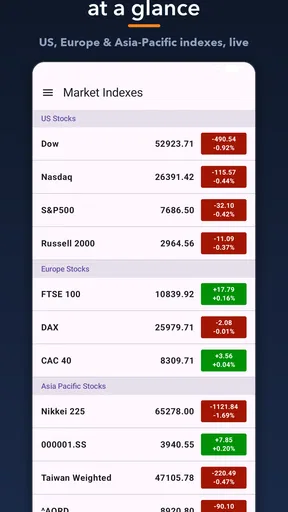
Our Review of Real Time Stocks Track & Alert
 Analysis by Appyee
I approached Real Time Stocks Track & Alert as a practical finance companion rather than a complete investing platform. Its focus is clear: helping me follow market prices, review charts, read related news, and set alerts without turning every session into a complicated research project. That narrow purpose is also its appeal. When I only want to check whether a company has moved, compare a few symbols, or keep an eye on a position during a busy day, the app feels more direct than opening a full brokerage platform.
The app is free to download, and its Everyone age rating makes it approachable for a broad audience. Dajax LLC is the developer, and the current version is 7.1.2. The product has been available since February 17, 2013, so it is not a new experiment trying to find its identity. It has had time to settle into the role of a market-watching tool, although that long history also means I judge it by modern expectations for speed, clarity, and control.
Its average rating is 4.0 from around 7,600 ratings, with roughly 1,900 written reviews and more than 100,000 installs. Those figures suggest a useful but not universally loved app. My own impression fits that middle ground: it can become a handy part of a market routine, but it is not the app I would choose for every investing task.
How the current experience works in everyday use
The best way to understand this app is to imagine a simple weekday scenario. I might be waiting for a train and want to check several companies before the market becomes more active. Instead of signing into a brokerage account, navigating through account balances, and passing through trading screens, I can use a dedicated tracker to look at prices and charts. That separation is valuable when I want information without the temptation to place a trade immediately.
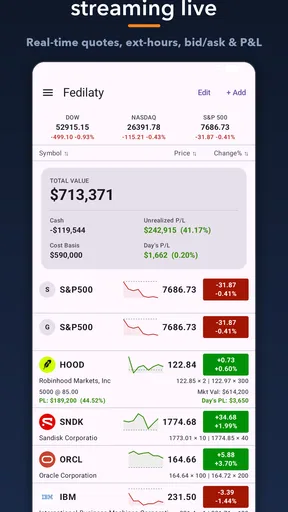
The app’s main strengths come from combining several small jobs in one place. I can follow market symbols, inspect price movement, look at chart history, read market-related news, and use alerts to avoid repeatedly refreshing a quote. None of those tasks is unusual on its own, but putting them together makes the app more useful than a basic quote widget or a news reader that happens to show prices.
I particularly like the distinction between checking a quote and monitoring a situation. A quote answers what is happening now; an alert helps me decide when it is worth looking again. That changes the workflow from constant checking to a more deliberate routine. I can review a chart, choose a price level that matters to me, and return to other work instead of watching every small movement.
There is an important caveat, though. Market information can be time-sensitive, and I would not treat a tracking app as the same thing as an execution system. Even when a price appears current, a displayed value is not automatically a guarantee of what I could buy or sell through a broker. For research and monitoring, this app makes sense. For an urgent transaction, I would confirm everything inside the brokerage service I intend to use.
The watchlist is most useful when it stays selective
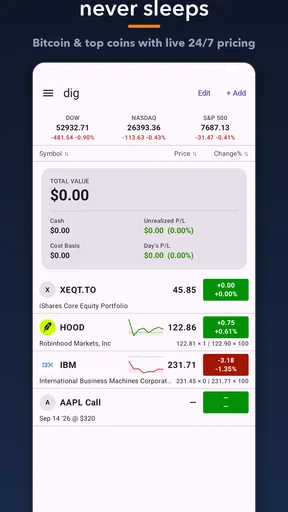
A common mistake with a stock-tracking app is adding every symbol that looks interesting. That creates noise and makes alerts less meaningful. I get better results by separating my watchlist mentally into a few groups: companies I already own, companies I may research, and broader market references that help explain the day. Even if the app does not impose that structure for me, using it as a personal rule makes the information easier to interpret.
For example, I might check a held position in the morning, keep a possible future purchase under observation, and use a broad index or sector reference to avoid judging one company in isolation. This is a more thoughtful use of Real Time Stocks Track & Alert than simply collecting symbols. The app becomes a dashboard for questions, not a stream of random movement.
Another useful habit is to decide why each symbol is on the list. If I cannot explain what I am watching for, the symbol probably does not deserve an alert. This prevents the alert system from becoming a source of anxiety. A price notification should mark a decision point for further research, not act as an automatic instruction to trade.
Charts help with context, not certainty
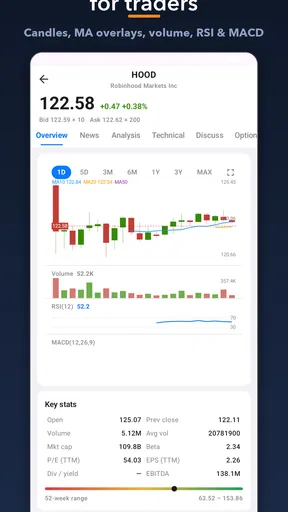
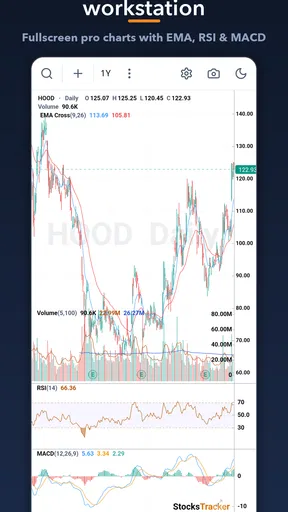
The chart feature is useful for seeing direction and recent behavior, especially when I want a quick visual answer instead of reading a sequence of numbers. A chart can show whether a move is isolated, part of a longer pattern, or simply a small fluctuation inside a wider range. That context is more helpful than a single quote viewed without history.
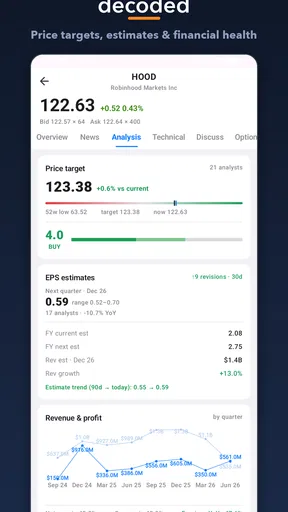
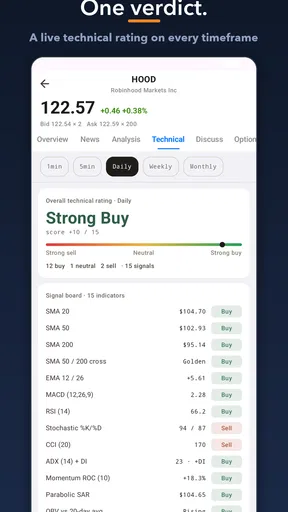
Still, I would avoid treating chart movement as a complete investment argument. A rising line does not explain valuation, business quality, debt, earnings, or the reason behind a news event. The app is better at helping me formulate the next question than at answering every question itself. I can use its chart as a starting point, then move to company filings, a broker’s research tools, or another trusted source when a decision requires deeper evidence.
This is one of the app’s most important trade-offs. Its compact market view reduces friction, but compact views also leave out detail. Beginners may appreciate that simplicity, while experienced investors may find themselves switching apps whenever they need more advanced analysis.
Alerts are valuable when I treat them as reminders
The alert function is the feature that gives the app a practical edge over a simple finance news page. I do not need to keep reopening the app just to see whether a watched price has reached a level I care about. That is especially useful during a workday, when constant checking would be distracting.
My preferred approach is to use alerts sparingly and attach a plan to each one. If a symbol reaches the chosen level, I might review the latest news, compare the move with the wider market, and decide whether further research is justified. I would not automatically buy or sell because an alert appeared. This small discipline turns notifications into useful prompts rather than emotional triggers.
There is also a psychological downside. Frequent notifications can encourage short-term reactions, particularly for users who are new to investing. Someone who wants a calm, long-term approach should choose wider, more meaningful thresholds instead of attempting to monitor every minor price change. The tool is neutral; the way it is configured determines whether it reduces effort or increases stress.
News adds a reason to investigate a movement
Price data tells me that something happened, while news may help explain why. Having market news near the quote and chart is convenient when I notice an unexpected move. I can use that combination to decide whether the change appears connected to a company announcement, a broader market event, or something that needs additional verification.
I would still read headlines carefully. A headline is not the same as a full explanation, and fast-moving financial stories can change as more information appears. The app is useful for discovery, but I would not base a major decision on a short news item alone. In practice, I use the news area to identify what deserves a closer look elsewhere.
This workflow is particularly helpful for people who do not want a separate news application and quote service. It saves a step, but it does not remove the need for judgement. The convenience comes from bringing related information together, not from turning market interpretation into an automatic process.
What the current version means for different users
The current version, 7.1.2, shows that the app remains maintained as a usable product rather than being left as an untouched legacy download. I see that as a positive sign for existing users who depend on a familiar market routine. At the same time, a version number by itself does not tell me that the app has become a full modern brokerage replacement. I would separate the fact of current availability from any expectation that every advanced feature has been added.
For someone already using the app, the main benefit of staying with it is continuity. A familiar tracker can be faster than learning a new platform, especially when the user’s needs are limited to quotes, charts, news, and alerts. If that workflow already works, there is little reason to abandon it simply because larger financial platforms offer more screens and tools.
New users should spend a few sessions deciding whether the app’s focused approach matches their habits. I would begin with a small watchlist, test how often I want notifications, and compare the app’s information with a source I already trust. That trial period is more useful than immediately filling the screen with dozens of symbols.
The free price makes experimentation easy, but the app also includes in-app purchases ranging from around two dollars to around ninety dollars per item. That range is wide enough that I would pay attention before confirming any purchase. I would first use the free experience to determine whether the workflow genuinely saves time. Paying for extras only makes sense if they solve a specific problem I have identified, rather than because a premium option appears alongside a market move.
Where it beats a brokerage app
A brokerage application is usually the better choice when I need account balances, order entry, portfolio management, deposits, tax documents, or direct access to a trading account. It is built around action and account administration. Real Time Stocks Track & Alert is more comfortable when I want a neutral observation space that is separate from my money-management screens.
That separation can improve concentration. I can review a company without being surrounded by buy and sell buttons, available cash, and order types. For a person who tends to make impulsive decisions after seeing a price move, this is a meaningful advantage. The app supports observation first, while the broker remains the place for execution and account-specific information.
The trade-off is that switching between tools takes time. If I need to research a symbol, decide on an order, check my position size, and place a transaction immediately, the brokerage app is more efficient. This tracker is strongest before that point, during the monitoring and preparation stage.
Where it beats a general finance portal
General finance portals often provide a wider range of information, including company profiles, analyst material, economic coverage, and detailed financial data. They may be better for deep research or for comparing a company’s fundamentals with its competitors. Their weakness can be clutter: many pages, advertisements, categories, and unrelated stories compete for attention.
This app’s appeal is the shorter path from opening the app to seeing the market items I personally care about. If my goal is to check a watchlist and respond to an alert, a focused tracker can feel more efficient. If my goal is to build an investment thesis, a broader research service is likely the better companion.
I would also compare it with a simple phone widget. A widget is excellent for a glance, but it usually does not provide the same room for charts, news, and alert management. The app requires an extra tap, yet gives me a more deliberate review. That makes it a better fit for a short analysis session than for a two-second status check.
Who should use it and who should skip it
I would recommend it to casual market followers, long-term investors who want a clean watchlist, students learning how price movement and news relate, and existing investors who want alerts without opening a trading account. It is also suitable for someone who follows a handful of companies and prefers a compact tool over a large financial dashboard.
I would be more cautious about recommending it to active traders who need sophisticated order tools, advanced technical studies, extensive fundamental research, or broker-level execution. It is also not the right sole source for someone making serious financial decisions without checking primary information. The app can organize attention, but it cannot replace financial judgement or a complete research process.
Small workflow improvements that make a difference
One practical tip is to review alerts at a fixed time instead of reacting to each one immediately. If several notifications arrive close together, I can first identify whether they reflect a wider market move. This helps prevent treating every individual price change as a company-specific event.
A second tip is to pair the chart with the news before forming an opinion. Looking at only the chart encourages pattern-based guesses; reading only the headline encourages a shallow explanation. Together, they provide a better prompt for checking what actually changed.
A third is to keep a simple note outside the app explaining why a symbol matters to me and what would make me reconsider it. The app can show the market movement, but a personal decision record helps me distinguish a planned review from a momentary reaction. This is especially useful when an alert arrives weeks after I first added the company.
A fourth is to treat the watchlist as temporary when appropriate. A company may be worth monitoring during a particular event and no longer deserve attention afterward. Removing inactive symbols keeps the alert system meaningful and makes the app faster to interpret at a glance.
Remaining friction and sensible expectations
The largest limitation is scope. A tool centered on real-time stocks, tracking, news, quotes, charts, and alerts can be very useful, but those features do not automatically provide a complete portfolio picture. Users who need detailed performance calculations, allocation analysis, or account-linked records may have to rely on another service.
There is also a risk of confusing convenience with precision. A quick quote is helpful, but I would still verify important information before acting. The same applies to news: it can point me toward an event, but it should not be the final word on what happened or what it means for a company.
The in-app purchase range is another reason to keep expectations clear. Free access lowers the barrier to trying the app, but users should understand what they are getting before paying for an optional item. I would not subscribe or purchase simply to unlock a feature I had not yet shown I needed.
Finally, the app’s simplicity may feel limiting after my habits become more advanced. That is not necessarily a flaw; it is a sign that the product is designed around monitoring rather than being an all-purpose investment workstation. The right question is not whether it contains every finance feature, but whether it handles the few tasks I repeat most often without unnecessary friction.
What I would watch as the product continues
For future use, I would pay attention to how well the app keeps its core information clear as market expectations change. The most valuable improvements would be those that make alerts easier to interpret, help users distinguish market-wide movement from company-specific movement, and preserve a quick path to quotes and charts.
I would also look for continued attention to the experience of existing users. Since the app has been around for many years, stability and familiar workflows matter. Major changes should improve clarity without turning a simple tracker into a crowded trading terminal. That balance will determine whether the product remains useful to people who chose it specifically for focused monitoring.
My final view is positive but measured. Real Time Stocks Track & Alert is a sensible free finance app for watching selected stocks, checking charts, following related news, and receiving reminders when a price deserves attention. Its strongest quality is the way it supports a calm monitoring routine without requiring me to open a brokerage account every time I want market information.
I recommend it as a tracking companion, not as a complete investing system. Use it to organize observation, create thoughtful alerts, and decide what deserves deeper research. Choose a broker or broader research platform when you need execution, account management, or detailed analysis. For the user whose main question is “what should I keep an eye on today?”, this app offers a practical answer without pretending to solve every part of investing.
Verdict
Strengths of Real Time Stocks Track & Alert
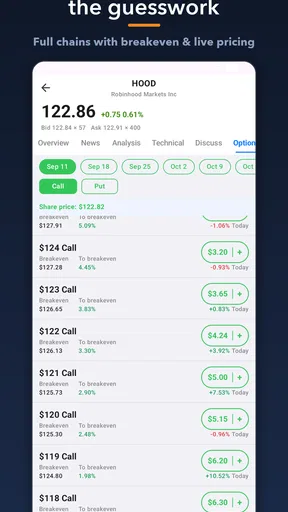
- Tracks stock prices, indices, ETFs, and currencies in real time.
- Custom price alerts help you react quickly to market movements.
- Clean charts make it easy to review price trends and performance.
- Watchlists keep your favorite assets organized in one convenient place.
- Useful for monitoring multiple markets without opening a brokerage account.
Limitations of Real Time Stocks Track & Alert
- Real-time data may require a subscription or vary by exchange.
- Some advanced charting and analysis tools may be limited.
- Market data can consume battery and mobile data during frequent updates.
- Alerts depend on notifications being enabled and a stable internet connection.
- It is a tracking tool, not a substitute for professional financial advice.
Similar Picks in This Category
View All
Google Wallet
Google LLC4.3

Airtel: Recharge, Bank & Loans
Airtel4.0

PayPal - Pay, Send, Save
PayPal Mobile4.2

DANA Indonesia Digital Wallet
PT Espay Debit Indonesia Koe4.5

Binance: Buy Bitcoin & Crypto
Binance Inc.4.8

Cash App
Block, Inc.4.7
Frequently Asked Questions
What is Real Time Stocks Track & Alert used for?
Real Time Stocks Track & Alert is designed to help investors monitor stock prices and market movements from a mobile device. After adding companies to a watchlist, you can follow price changes, review relevant market information, and receive alerts when selected stocks reach a level or condition that matters to you. It is mainly useful for quick monitoring rather than replacing a complete brokerage platform.
Does Real Time Stocks Track & Alert provide truly real-time stock prices?
The app focuses on real-time or near-real-time tracking, but the exact speed and availability of quotes can depend on the exchange, market, region, and data provider. Some markets may have delayed information, while others may require a subscription or have specific licensing restrictions. Before making a trade, users should verify prices through their broker or an official exchange source.
Can I create alerts for specific stock prices and market changes?
Yes, alerts are one of the app’s main features. You can generally select a stock and set a notification for events such as reaching a target price, falling below a chosen level, or experiencing a notable movement. Alert options may vary by version and subscription plan, so it is worth checking the available settings before relying on the app for time-sensitive decisions.
Is Real Time Stocks Track & Alert suitable for beginners?
The app can be useful for beginners because watchlists, price tracking, and notifications make it easier to follow a small group of companies without constantly checking financial websites. However, it does not remove the need to understand investing basics, market volatility, fees, and risk. New investors should treat the app as an information and monitoring tool, not as personalized financial advice.
Does the app allow me to buy or sell stocks directly?
Real Time Stocks Track & Alert is primarily intended for tracking prices and receiving market notifications, not necessarily for executing trades. Whether trading is available depends on the app’s current features and any supported brokerage integrations. Users should review the app description and permissions before downloading. If direct trading is unavailable, orders must be placed separately through a regulated broker.
